

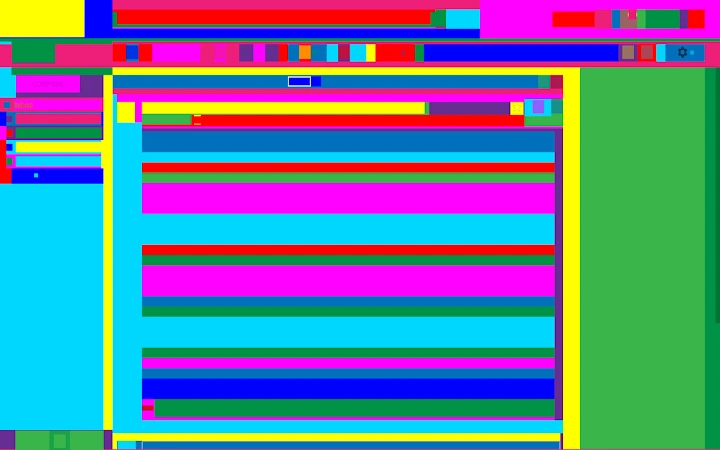
Description
Transform Web Pages Into Abstract Art
Overview
Abstract Browsing is a browser extension designed to reimagine the act of web navigation as a dynamic art experience. By converting any visited website into a vibrant, abstract composition, it allows users to engage with digital content in a visually immersive way. The core purpose is to blend functionality with creativity, enabling users to surf the web normally while transforming the visual presentation into an ever-evolving artwork. This tool is ideal for digital artists, creative professionals, and anyone interested in exploring new ways to experience online content.
Developed as an art project by Rafaël Rozendaal, known for pioneering web-based interactive art, and coded by Reinier Feijen, the extension operates entirely within the browser environment. It does not alter the underlying structure of websites or interfere with functionality—links remain fully active, and navigation is uninterrupted. The extension can be toggled on and off at any time, offering flexibility for both artistic exploration and practical browsing.
Real-world usage scenarios include using the extension during creative brainstorming sessions, displaying abstract web compositions on secondary monitors for ambient inspiration, or incorporating it into digital art installations. It serves as a bridge between everyday web use and artistic expression, redefining how users perceive online environments.
Key Features & Capabilities
- Real-Time Abstract Transformation – Instantly converts any website into a colorful, abstract visual composition while preserving full interactivity.
- Toggle On/Off Functionality – Users can activate or deactivate the effect at any time without reloading the page.
- Non-Invasive Design – Does not modify website content, scripts, or navigation; all links and functionality remain intact.
- Artistic Customization via Code – Built with creative coding principles, allowing for potential future enhancements through open-source contributions.
- Seamless Browser Integration – Works across major browsers without requiring additional setup or configuration.
These features enable users to maintain normal browsing habits while experiencing a constantly shifting visual landscape. For example, a designer might use the extension to visualize the flow of information on a news site through color and form, turning data into a sensory experience. A student could explore abstract representations of academic resources, fostering creative thinking. The extension’s minimal footprint and non-disruptive nature make it suitable for both casual experimentation and professional creative workflows.
User Interface, Workflow & Performance
The user interface of Abstract Browsing is intentionally minimal, aligning with its role as a background artistic layer. No dedicated dashboard or settings panel is present; the transformation occurs automatically upon activation. Navigation is handled entirely through standard browser controls, ensuring a familiar experience for all users.
Workflow efficiency is high due to the extension’s lightweight nature and immediate effect. Once enabled, the visual transformation applies instantly, with no noticeable delay. The developer did not specify resource usage details, but based on its 2.5 MB size and browser-based architecture, it is expected to operate with minimal impact on system performance. Stability is maintained through reliance on standard browser APIs, reducing the risk of crashes or conflicts.
Performance observations are based on general software behavior patterns. The extension runs in the background, using browser rendering layers to apply visual effects. CPU and RAM behavior are not documented, but the absence of heavy processing or external dependencies suggests low overhead. Users can expect consistent performance across different websites and browsing sessions.
Compatibility & System Requirements
Abstract Browsing is compatible with Windows, Mac, and Linux operating systems, ensuring broad accessibility across desktop platforms. It is designed as a browser extension, meaning it integrates with major web browsers such as Chrome, Firefox, and Edge, though specific browser versions were not listed.
The installation size is 2.5 MB, which is compact and suitable for quick deployment. Exact system requirements were not listed, but the extension’s lightweight design and browser-native operation suggest compatibility with standard modern hardware. No additional software or drivers are required for installation or operation.
Platform compatibility information is limited to the supported operating systems. The developer did not provide details on minimum processor speed, RAM, or graphics capabilities. Users are advised to ensure their browser is up to date for optimal functionality.
Pros and Cons
Pros
- Turns any website into a dynamic abstract artwork without disrupting functionality
- Free to use with no hidden costs or subscriptions
- Lightweight design with minimal impact on system resources
- Easy to toggle on and off for flexible use
- Developed by recognized digital artists, ensuring artistic credibility
Cons
- No visible settings or customization options for visual effects
- Limited to browser-based operation; not available as a standalone desktop app
- No official documentation or user guide provided
- Visual transformation may distract users during focused browsing tasks
- Dependent on browser stability and updates for continued performance
FAQ Section
Is Abstract Browsing available for all major browsers?
The extension is designed to work with modern browsers, though specific browser compatibility details were not provided by the developer.
Is the extension safe to install?
Yes, the extension is developed by established digital artists and operates within standard browser security models. It does not access personal data or alter website content.
Does the extension require updates?
Updates are managed automatically through the browser’s extension store. Users should ensure their browser is updated to maintain compatibility.
Can I use the extension offline?
Yes, once installed, the extension functions without an internet connection, though it requires an active web page to apply its visual transformation.
What type of license does the extension have?
As a free browser extension developed as an art project, it operates under a non-commercial, open-use license. No formal license terms were published.
Final Thoughts
Abstract Browsing stands out as a unique fusion of technology and artistic expression. It transforms the mundane act of browsing into a visual journey, offering users a fresh perspective on digital content. While it lacks advanced customization or settings, its simplicity is part of its strength—allowing immediate engagement without technical barriers. The extension is particularly valuable for creatives seeking inspiration, educators exploring digital media, or anyone curious about the intersection of art and the web.
Its free availability, lightweight design, and seamless integration make it accessible to a wide audience. For those who value innovation in digital experiences, this tool delivers a distinctive and memorable interaction. It is not a productivity enhancer in the traditional sense, but rather a creative catalyst.
Download Abstract Browsing now to experience the web through a new artistic lens.
Guides & Tutorials for Abstract Browsing Extension for Chrome
How to install Abstract Browsing Extension for Chrome
- Click the Preview / Download button above.
- Once redirected, accept the terms and click Install.
- Wait for the Abstract Browsing Extension for Chrome download to finish on your device.
How to use Abstract Browsing Extension for Chrome
This software is primarily used for its core features described above. Open the app after installation to explore its capabilities.
User Reviews for Abstract Browsing Extension for Chrome 0
No reviews found





